
Job applications
Contact details, work links, resumes, cover letters, dropdowns, and profile questions.
Saved profiles, filled on demand.
Save the details you use often. Choose a profile, fill the page, then review the result before you submit.
Browser downloads
Edge and Firefox coming soon.
Use cases
Contact details, work links, resumes, cover letters, dropdowns, and profile questions.
Account setup, product trials, business registrations, onboarding, and profile forms.
Company details, service descriptions, quote requests, partner forms, and procurement portals.
Contact pages, support tickets, internal tools, CRM fields, test profiles, and repeat admin.
The workflow
Open the form, choose a profile, fill the page, then review the result. No account needed for the core flow. You submit only when ready.
Keep separate profiles for work, personal admin, clients, vendors, QA users, or hiring workflows.
Use the popup, side panel, on-page picker, right-click action, or keyboard shortcut.
Add a smart rule when a site uses unusual wording. FillAhead remembers it for the next similar form.
Undo the fill if the page needs another pass. You decide when the form leaves the browser.
Before submit
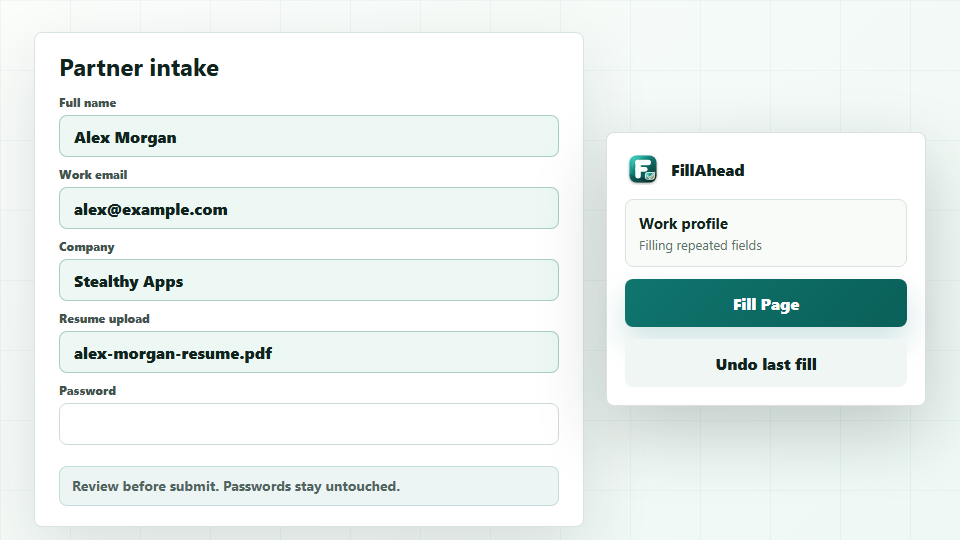
FillAhead highlights what changed, shows matched uploads, and keeps Undo close if the page needs another pass.
Handles more than basic text fields
Searchable dropdowns, custom fields, popup forms, sections that appear late, and pages that update while you type.
Multi-step forms, modal windows, split phone fields, birthday fields, country and state fields, radios, and checkboxes.
Resume, CV, portfolio, cover letter, document, CSV, and spreadsheet upload matching from the profile you pick.
How it fits
Use FillAhead for repeated profile details, work questions, business fields, uploads, and long answers. Keep sign-ins and payments with the tools made for them.
FillAhead picks up the job-application, intake, support, and business fields that basic autofill usually leaves behind.
FillAhead works beside them for the profile-style fields around the login or account setup flow.
FillAhead maps structured profile data into fields, dropdowns, radios, checkboxes, textareas, and uploads.
FillAhead takes a simpler approach: start with a profile and add a rule only for an unusual field label.
Pricing
Free
Three profiles for the forms you fill most.
Pro
$29.99 per year. Choose monthly or yearly inside FillAhead.
Monthly and yearly plans renew until canceled. Cancel online. First charges and renewal charges have a 14-day refund window. Read the terms.
Questions
Repeated profile fields: names, contact details, company info, work links, long answers, dropdowns, checkboxes, radios, textareas, and upload fields the page exposes to the extension.
No. Profiles are saved in your browser unless you export them. Export and support share only what you choose. Pro checkout sends license and payment details, not saved profile values.
Fill Page runs on the page you choose after you click it. The optional in-page button and auto-fill request access only for sites you enable, and both can be turned off in Settings.
No. Keep sign-ins, payment cards, one-time codes, and wallets with tools made for those jobs. FillAhead handles the repeated profile fields around them.
Send the page, field label, what happened, and what you expected. That is usually enough for us to investigate.
FillAhead by Stealthy Apps